Your team of agents
on your computer.
A free, open-source app with AI agents that write and run code on your computer to finish real work.
Available for macOS, Windows, and Linux. All downloads and system requirements
You asked
Sort the invoices in my Downloads folder by month and vendor, rename them properly, and total them up.
Looked in Downloads. Found 412 invoice PDFs.
DoneWrote a script to read the vendor and date off each page.
Donefor pdf in downloads.glob("*.pdf"): vendor, date = read_header(pdf)Security check passed.
DoneReads and renames files inside Downloads only.
Renamed 412 files and filed them by month.
Donescan_0043.pdf becomes 2026-03-11 Northline Lumber.pdf
Built invoices-2026.csv.
Done412 rows · $84,310.62
invoices-2026.csv
| Month | No. | Total |
|---|---|---|
| January | 31 | $6,412.80 |
| February | 28 | $5,988.15 |
| 10 more months | 353 | $71,909.67 |
| Total | 412 | $84,310.62 |
The short version.
- Free and open source
- MIT-licensed. Every line is on GitHub (opens in a new tab).
- Runs on your own computer
- Your files never have to leave it.
- macOS, Windows, and Linux
- One app for all three. Download v0.12.8
Three steps
How it works
You ask in your own words and it runs on your machine.
You ask.
Type the request the way you would ask a person. The agent reads it and makes a plan you can see before anything happens.
Step 1
~/Pictures/Shoot-0412Make web-sized copies of the 62 photos in this folder, and skip the blurry ones.
The plan
- Open every photo in the folder
- Resize to 1600 px wide
- Skip anything too blurry
The work is checked.
Before anything runs, a separate security-checking agent reviews the plan. You see the check, and you approve the step. That is the whole gate.
Step 2
- Opened 62 photos
- Wrote a resize script. 1600 px wide, quality 82.
- Security check passed. Writes only into /web.
48 of 62
You keep the result.
The agent runs real code on your computer and shows you the result as it goes. It keeps the skill for next time.
Step 3
~/Pictures/Shoot-0412/web- 58 web-sized copies
- 4 skipped as blurry
Step 1
Make web-sized copies of the 62 photos in this folder, and skip the blurry ones.
The plan
- Open every photo in the folder
- Resize to 1600 px wide
- Skip anything too blurry
Step 2
- Opened 62 photos
- Wrote a resize script. 1600 px wide, quality 82.
- Security check passed. Writes only into /web.
48 of 62
Step 3
- 58 web-sized copies
- 4 skipped as blurry
Each step is shown with a snapshot of the same task at that stage: the request, the checked plan, and the finished result.
Recordings
See it work.
Six recordings from the real app, one tab at a time.
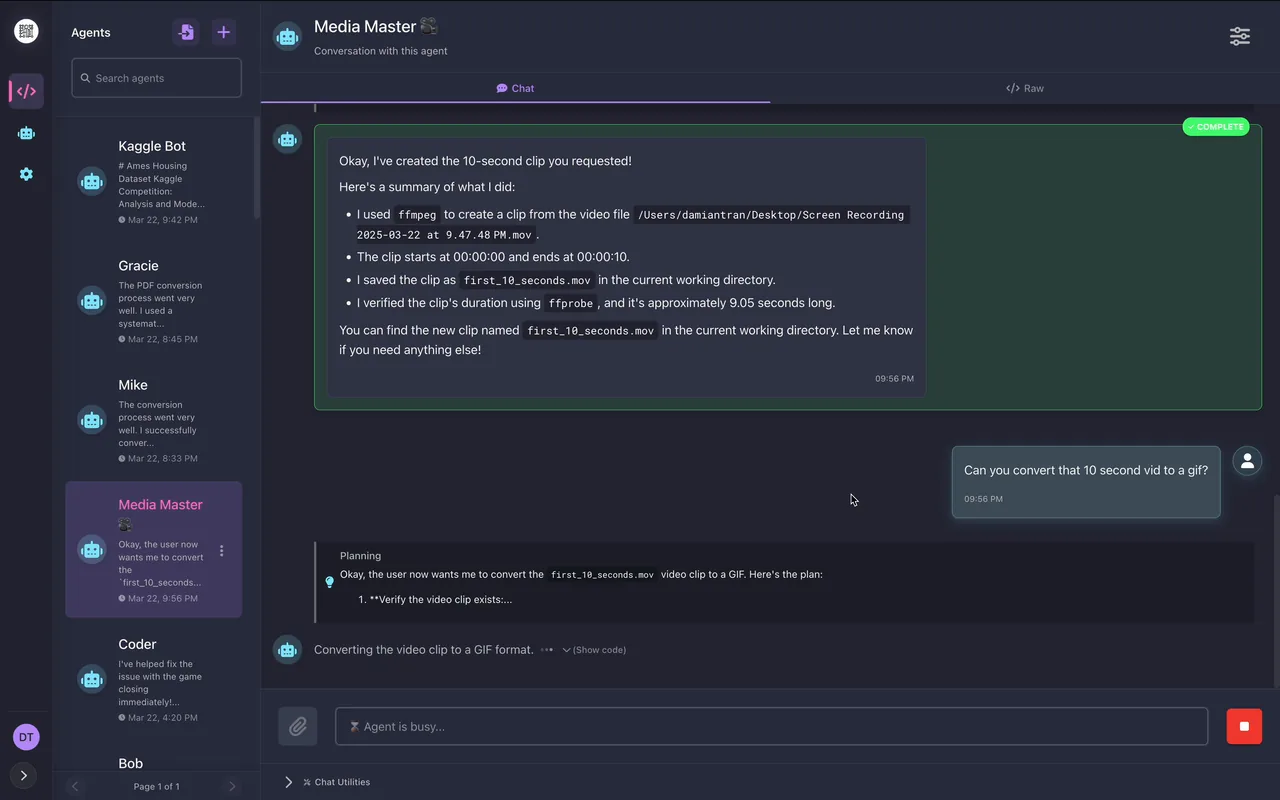
Recording 1 of 6
Edit your clips
Cuts, conversions, and splices on your own video files, verified as they run.
What happens in this recording
- You ask for a clip of the first ten seconds of a screen recording, shown in the chat.
- The agent plans the cut and runs ffmpeg.
- It verifies the new clip's length from the command output and reports the file.
- You ask for a GIF, and it converts the clip and confirms the GIF.
- You ask to splice two clips, and it extracts both, concatenates them, and verifies the result.
Recording 2 of 6
Plan a content niche
Trend and audience research for a creator, written into a strategy report.
What happens in this recording
- You ask for video ideas for a hair and makeup tutorial channel, with room for new niches.
- The agent plans and researches current beauty trends, posting reflections as it goes.
- It identifies underserved audiences and tutorial formats.
- It compiles a comprehensive report with named niches and a conclusion.
- It saves the report as a file in the Canvas.
- You ask for a PDF, and it converts the report.
Recording 3 of 6
Price a portfolio
Portfolio valuation with live prices fetched and computed in code.
What happens in this recording
- You ask for the current value of your stock portfolio, with quantities listed in the request.
- The agent plans to fetch live prices from the web.
- It runs code that looks up each ticker and multiplies by your quantities.
- It posts the total and the per-line values.
- You ask a follow-up about the biggest position, and it answers from the same data.
Recording 4 of 6
Explore your data
A CSV explored, charted, and explained, with the analysis written in code.
What happens in this recording
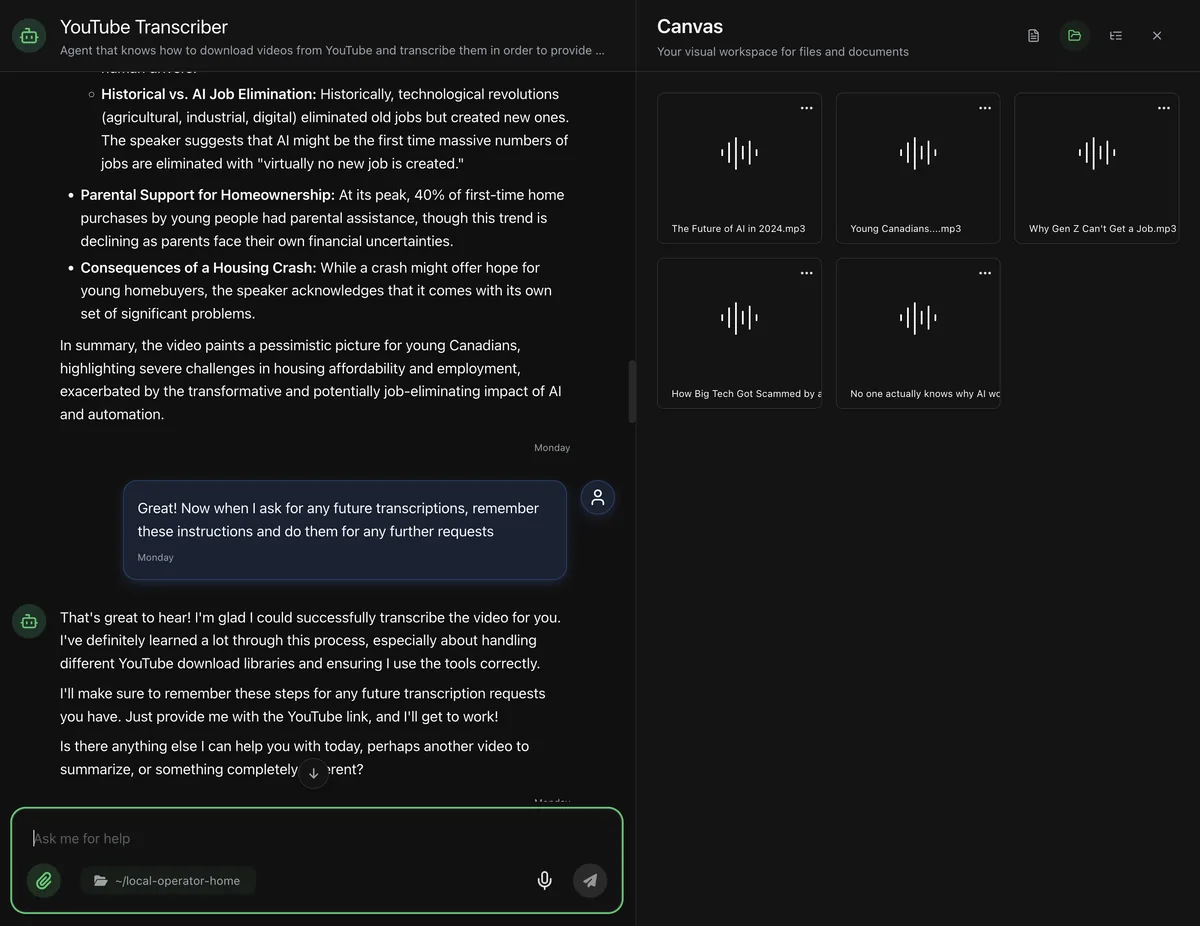
- You ask for a summary of a Kaggle housing-prices dataset that lives in a local folder.
- The agent loads the data and shows a histogram to understand its shape.
- It runs exploratory analysis, posting scatter plots and correlations.
- It preprocesses missing values and skewed features, saving a cleaned CSV.
- It builds and compares regression models, showing a feature-importance chart.
- It writes a submission file for the competition and reports what it did.
Recording 5 of 6
Build a game
A playable Space Invaders written from conversation, improved on your feedback.
What happens in this recording
- The recording opens mid-project: the agent reflects on the modular structure it built and fixes collision and rendering issues in the sprite code.
- You ask for score progression, and the agent adds score tracking with increasing difficulty, showing the running game.
- You report a crash when pressing keys during play, and the agent fixes the menu and game-state handling.
- You ask for a menu system and additional levels; the agent plans the screens and creates menu.py and the game states.
- It integrates the menu into main.py and fixes the issues the test run exposed.
Recording 6 of 6
Research an industry
Web research across many sources, written up as a markdown report.
What happens in this recording
- You ask for a comprehensive report on the competitive landscape of AI agents.
- The agent posts its plan, runs an initial search, and reflects on what it found.
- It runs further targeted searches on definitions, major companies, and positioning, reflecting after each one.
- It compiles the findings into a structured markdown report with sections and lists.
- It saves the report as a file in the conversation and reflects on next steps.
These are screen recordings of the real app, not animations.
Code
It writes its own tools.
Most assistants stop at the tools they ship with. This one writes the tool.
When a task needs a capability that does not exist, the agent writes code to make it. The toolset grows with your to-do list. It plans, runs, checks the result, and fixes its own errors, on your machine. You never write any of it yourself: you ask in your own words, and writing the code is the agent's job.
How far can that go? Local Operator drove a data-science notebook that placed in the top 5% of a Kaggle housing-price competition (opens in a new tab), an open contest anyone can enter. The notebook is public, so you can check every step yourself.
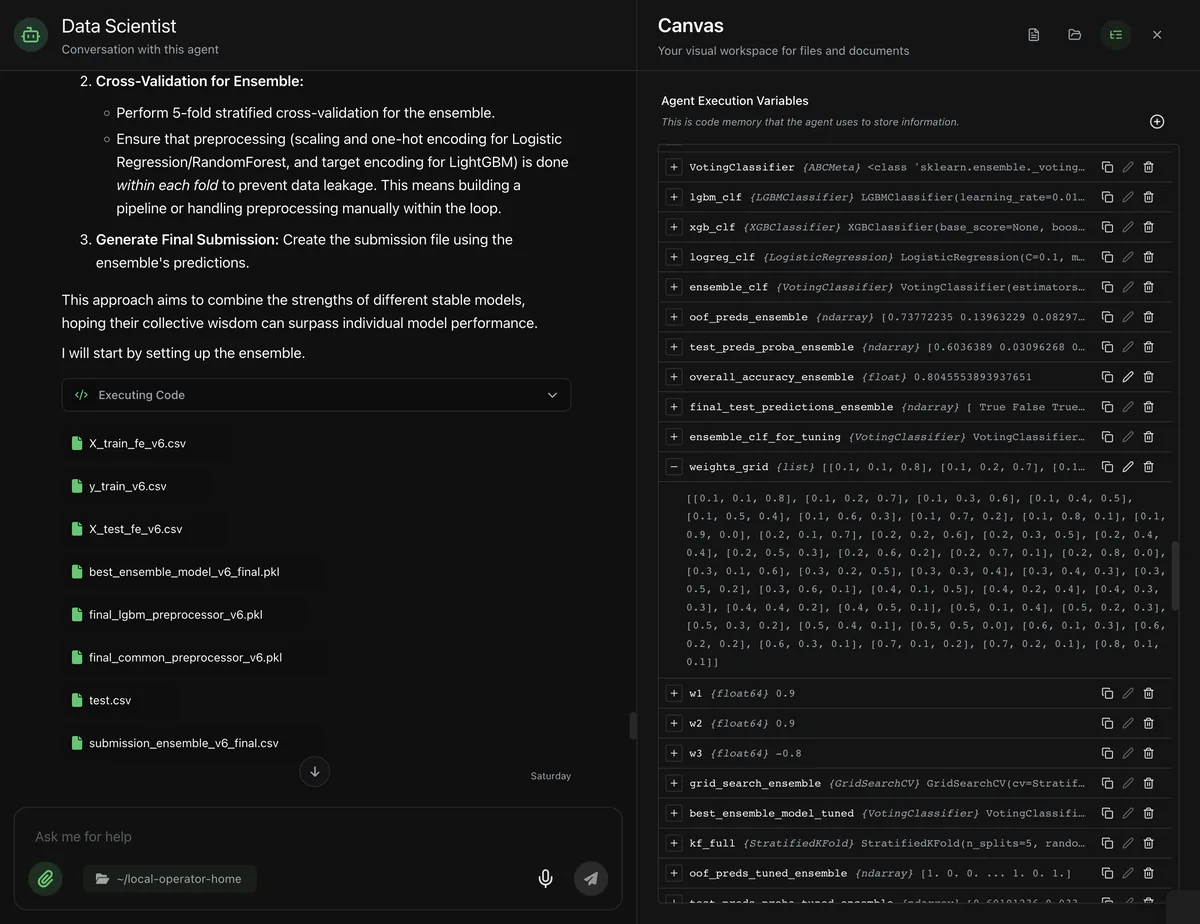
Files
It works with your
real files.
Photos, statements, PDFs, folders. The agent opens them on your machine and writes the results back.
Point the agent at a folder and it works with what is inside. Results come back as files you can open, and appear in the Canvas panel while it works. Nothing has to be uploaded anywhere first.
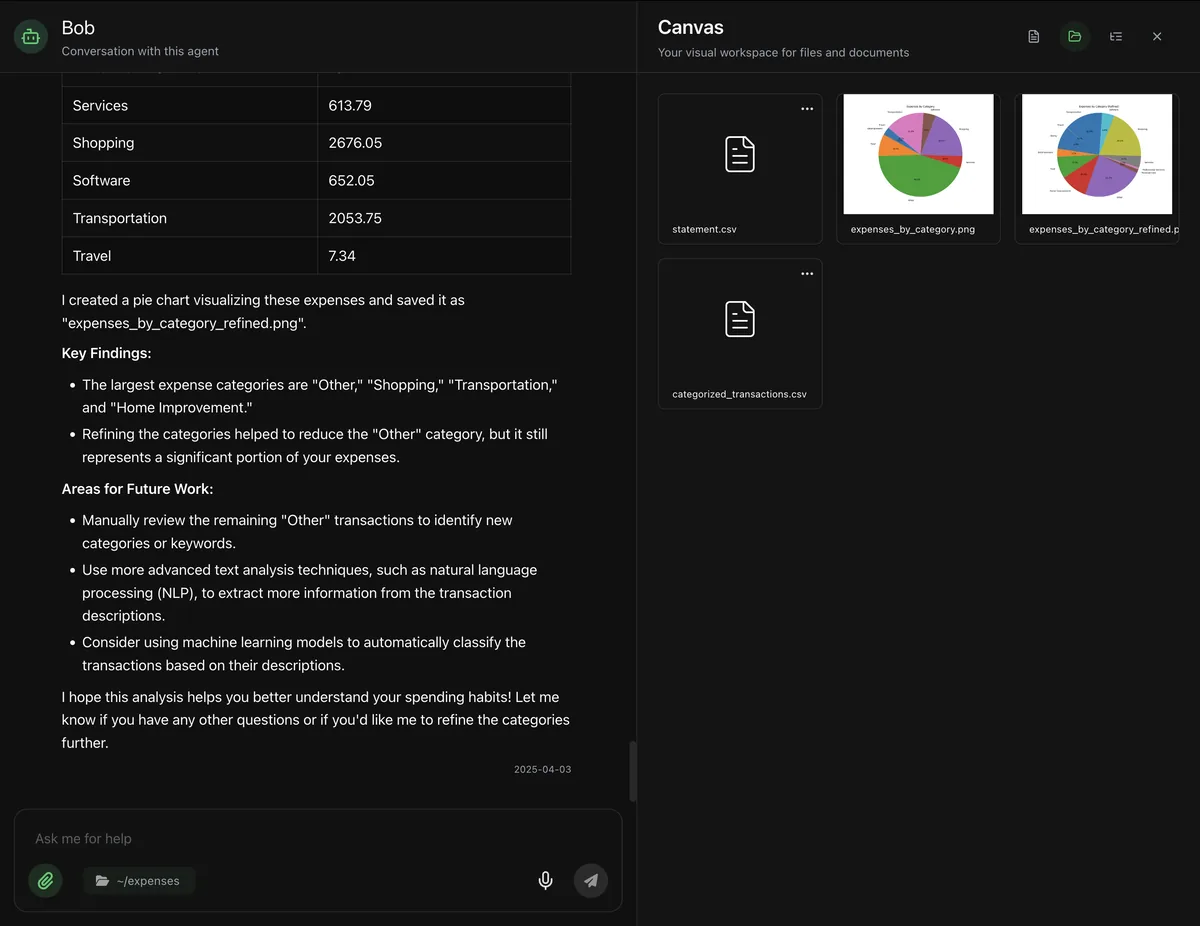
Memory
Teach it once.
Show an agent how you like a task done. It remembers next time, and the skill can be shared.
Tell an agent how you like something done, once, in conversation. It keeps the skill and applies it to every future request. Taught agents can be shared, so someone else starts where you finished.
Scheduling
It works while you're away.
Say every weekday at 5pm and it happens, whether you are there or not.
Scheduled agents run in the background and report back. The recurring jobs stop living in your head and start living in the app.
every weekday at 5pm, send me a competitor pricing report
Scheduled. Next run: today, 5:00 pm.
The Agent Hub
No agent works alone.
Your agents route work to whoever is best at it, and the Hub lends you taught agents.
They pass work to each other
Agents hand work to whichever agent is best at it, so a research agent can pass numbers to a numbers agent without you routing anything.
Borrow an agent someone taught
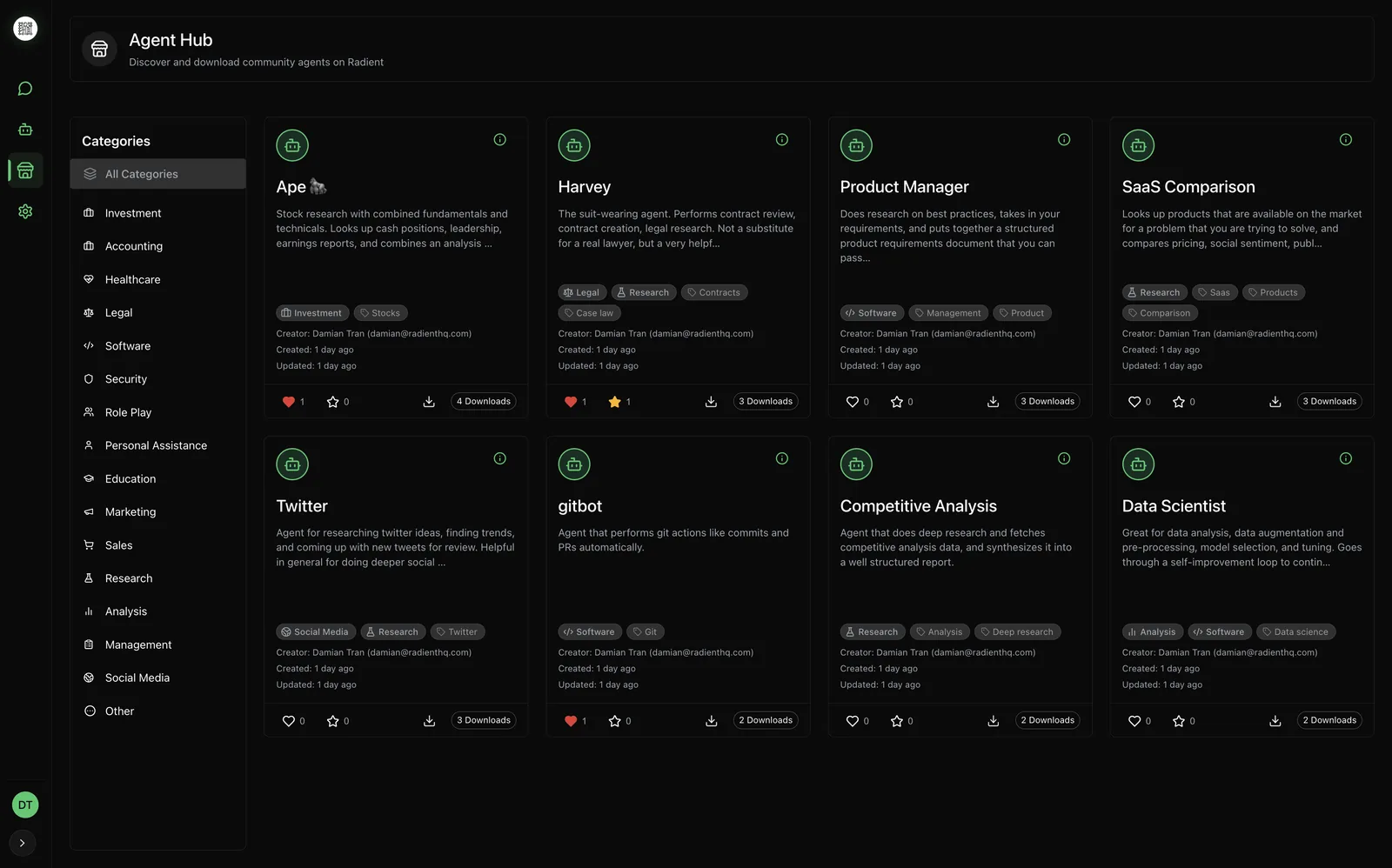
The Agent Hub, powered by Radient (opens in a new tab), is the community shelf of taught agents: pull one down, add it to your team.
Privacy
Your files don't leave
your computer.
Because everything runs on your computer, the list of things you have to trust is short.
Stays on your computer
No upload step.
Agents open your files where they already are. There is nowhere to upload them to.
Nothing runs you didn't approve.
A separate security-checking agent reviews each proposed action, and you sign off before it runs.
No account required.
The app works without one. You create an account only if you opt into the optional cloud platform.
No lock-in.
Fork it, keep using your own copy, or walk away with your files. Nothing holds you.
Leaves only if you choose it
Hosted models see the conversation.
Radient Pass and other hosted providers run the model on their own machines, so the words you send go there. Your files stay put.
Your own keys send it too.
Paste in an API key you already pay for and the conversation goes to that provider, on your account, under their terms.
And when you choose a local model, even the conversation stays home. Read the privacy policy
Models
Use the models you like.
Pick one and switch whenever you like. No model is locked to the app.
Radient Pass
radient/passOne prepaid balance across hosted providers, with an Automatic mode that picks a model per step. You pay only for the compute you use.
About Radient Pass (opens in a new tab)Your own keys
OPENAI_API_KEYPaste in the API keys you already pay for. The agent uses them directly.
Local models
ollamaRun everything on your own machine with Ollama. The most private option, and it works offline. Switch to it per agent or per conversation.
Pricing
Free. Open source. That's the pricing.
The MIT license covers it, and there is no paid tier of the app itself. No subscription, no account, no trial clock. Radient Pass is the optional paid path for hosted models; you pay only for the compute you use.
Learn
Guides to get you going.
Walkthroughs from people who use it, each short enough to finish with a coffee.
- Medium5 min read
Set up Local Operator, step by step
A step-by-step walkthrough of installing Local Operator and running your first task.Read the guideMedium article, 5 minute read, opens in a new tab. - Medium7 min read
An AI tutor for learning a language
How one user broke through a learning plateau with an Urdu tutor that adapts and quizzes.Read the guideMedium article, 7 minute read, opens in a new tab. - Medium13 min read
Figure out pricing for your small business
Use agents to work out pricing when costs keep changing, with the math done in code.Read the guideMedium article, 13 minute read, opens in a new tab.
FAQ
Questions, answered.
The things people actually ask before installing.
Is Local Operator really free?
Yes. The app is free and open source under the MIT license, with no subscription, account, or trial period. The only thing you might pay for is AI model usage, and one of the three ways to connect a model, running a model on your own machine, is free.
What can it do that a chatbot can't?
It finishes tasks instead of describing them. A chatbot tells you how to sort a folder; Local Operator sorts it. It writes and runs real code on your computer, works with your actual files, and can repeat the job on a schedule.
Does my data leave my computer?
Some of it does, and you choose which. Your files never leave your computer. The text of your conversation goes to whichever AI model you pick, so a local Ollama model means nothing leaves at all.
What stops it from doing something I didn't want?
Two gates. Every action is checked by a separate security agent before it runs, and you approve what happens. The agent also shows its plan first, so surprises are rare and reviewable.
Do I need to know how to code?
No. You ask in plain language and the agent writes and runs the code itself. You never have to read the code, though it is always shown if you want to see it.
Which AI models does it work with?
Any of them. Use hosted models through the optional Radient Pass, plug in your own API keys, or run fully local models with Ollama. You do not need any key if you choose a local model, and you can switch at any time.
What kind of computer do I need?
Any recent desktop. macOS 11 or newer, Windows 10 or newer, or a typical Linux machine from the last few years. The installer is a few hundred megabytes, and the app sets up its own backend on first run.
Can I use it without an internet connection?
Yes, with a local model. Once the app is installed and an Ollama model is downloaded, agents can work on your files offline. Web research and hosted models are the parts that need a connection.
Your team is ready.
Free and open source, installed in minutes. Your computer is the only server it needs.
Available for macOS, Windows, and Linux.